Beginner guide to Chinese models in Codex
How to use DeepSeek, Qwen, and Kimi in Codex with 1routers: a 4-step beginner guide
Already launching Codex through 1routers but unsure how to change models? The model picker is inside the Codex composer. This guide starts with that first click and distinguishes setup problems from temporary model availability.
The short answer: you do not need three separate provider API keys
To use DeepSeek, Qwen, or Kimi in Codex through 1routers, follow four steps: launch Codex from 1routers → open the model picker below the composer → choose a currently available model → send a read-only connection test.
- Sign in to 1routers and launch Codex from its menu.
- Start a new task and click the current model name at the bottom of the composer.
- Search for
DeepSeek,Qwen, orKimi, then select the model you want. - Send a test that explicitly forbids reading or changing files before using the model on real work.
When you use routes supplied by 1routers, you do not have to buy and configure a separate API key from DeepSeek, Alibaba Cloud Model Studio, and Kimi. You do need an active 1routers account and a model that is present in your signed-in Codex model picker.
Before you begin: launch Codex from 1routers
1routers keeps its credentials, model catalog, and routing settings in an isolated Codex environment. Launch Codex from the 1routers menu whenever you want to use those models. Opening another ChatGPT/Codex instance directly may show only its original model list.
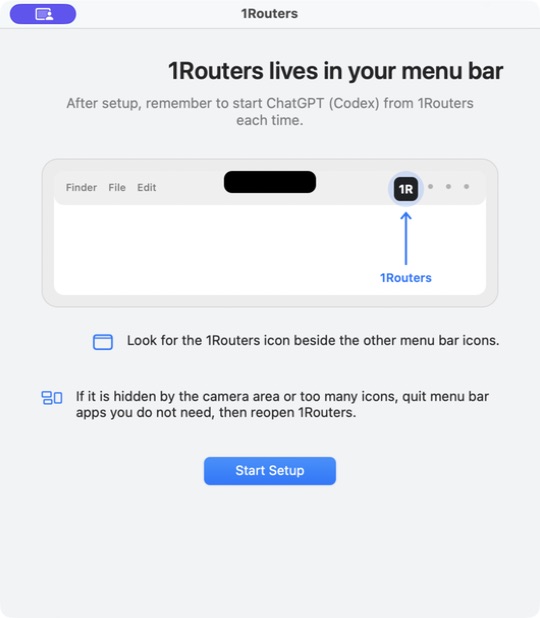
If setup or account connection is not complete, follow the four-step Codex beginner setup first. If Codex already opens correctly from 1routers, continue below.
Step 1: find the model picker in Codex
Open a disposable test folder and start a new task. The current model name appears at the bottom of the composer, usually next to the reasoning level such as Medium. Click the model name to open the list.
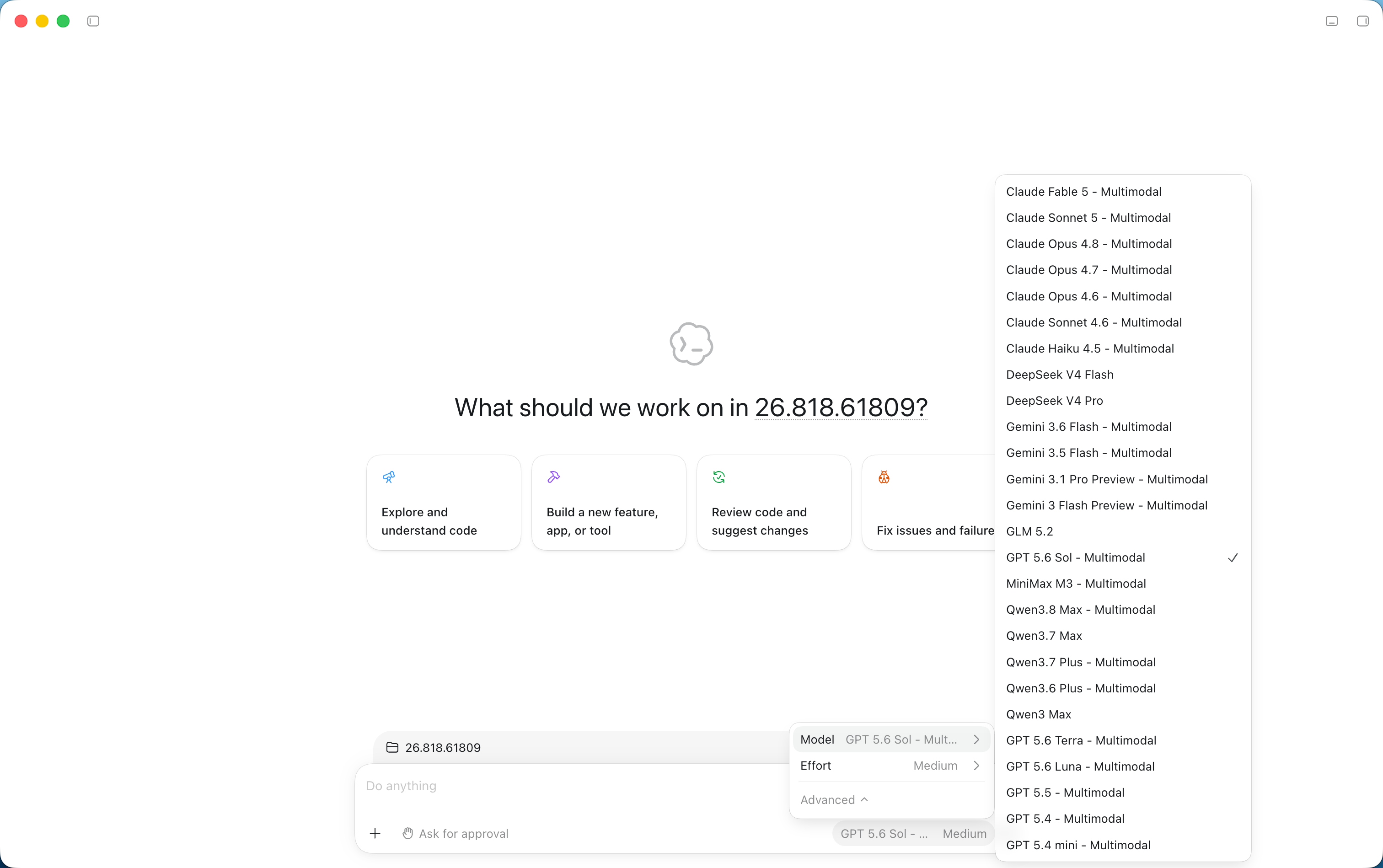
The exact placement may change as the desktop app evolves. You do not need a separate provider or API settings page: look for the current model name near the send button.
For fair comparisons, start a new task for each model and keep the prompt, project files, and route tier unchanged. That makes differences in output, latency, and cost easier to interpret.
Step 2: choose DeepSeek in Codex
Search the model list for DeepSeek. At publication time, the tested 1routers catalog included:
- DeepSeek V4 Flash for repository orientation, error explanations, drafts, and frequent small tasks.
- DeepSeek V4 Pro for more involved planning, multi-file changes, and tasks that need deeper reasoning.
For a first connection test, start with the Flash model. Compare Pro on a representative task if the work is more complex or the first result is not reliable enough.
Send this harmless test after selecting the model:
Reply with exactly one sentence: “DeepSeek connection test passed.”
Do not read, create, or modify files, and do not run commands.
A normal response confirms that model selection and routing are working. You can then try a narrowly scoped task such as: “Read only the README and list three possible improvements. Do not edit the file.”
Step 3: choose Qwen in Codex
The Tongyi Qianwen family normally appears under the English brand name Qwen. If searching for “Tongyi” or “Qianwen” returns nothing, search for Qwen. The tested catalog included Qwen3.8 Max, Qwen3.7 Max, Qwen3.7 Plus, Qwen3.6 Plus, and Qwen3 Max.
Beginners can use this starting point:
| Your task | Try first |
|---|---|
| Chinese-language requirements, code explanation, everyday development | A recent Qwen Max or Plus visible in the list |
| Understanding a screenshot or image | A Qwen model explicitly labeled Multimodal |
| Comparing speed and cost | Run the same task on one Max and one Plus model |
Do not infer image support from the version number alone. 1routers appends Multimodal when the catalog says that model accepts images; otherwise, treat it as text-only.
Copy this Qwen test:
Reply in English: “This task will use Qwen.”
Do not read or modify files. In one more sentence, explain how you would confirm the edit scope.
Step 4: choose Kimi in Codex
Kimi uses the same entry point: open the model picker, search for Kimi, select a version currently listed, and send a connection test. Kimi's official catalog currently includes Kimi K3 and the Kimi K2.7 Code model for software-engineering work, but the versions available through 1routers are whatever your signed-in picker shows at that moment.
Kimi was not present in the tested 1routers catalog when this article was written. If you see the same result, do not install an untrusted setup script or paste a key from the web into the chat. Instead:
- Confirm that Codex was launched from 1routers.
- Quit that Codex instance, relaunch it from 1routers, and check once more.
- Review current model and route availability in your 1routers account.
- If Kimi remains absent, use DeepSeek or Qwen for now and switch when Kimi returns to the catalog.
When Kimi appears, verify it with:
Reply with exactly one sentence: “Kimi connection test passed.”
Do not read, create, or modify files, and do not call tools.
Which model should a beginner choose?
No model is best for every task. Start from the job rather than the logo.
| Model family | A useful first test | Tested catalog status |
|---|---|---|
| DeepSeek | Code explanation, repeatable edits, and cost-sensitive daily work; compare Flash and Pro for complex work | Visible |
| Qwen | Chinese-language collaboration and everyday coding; choose an explicitly Multimodal version for images | Several versions visible |
| Kimi | Long-context software-engineering or coding work, depending on the exact listed version | Not visible during this test |
The most useful comparison is one small, real, safe task run on each model. Record whether it understood the request, changed only the intended files, passed tests, and used an acceptable amount of credit. A polished opening sentence is not enough evidence.
Why 1routers is simpler than manual provider setup
Official provider guides typically ask you to obtain an API key, set environment variables, select a compatible protocol, and sometimes create model metadata. That flexibility is useful for experienced terminal users, but a typo in a model ID, file path, or quote can leave a beginner with an app that does not start or a missing model picker.
1routers prepares credentials and the model catalog inside an isolated environment after account connection, while model choice stays in the Codex interface. It does not promise permanent model uptime or remove differences in balance, route health, or model capability. It reduces configuration and key management while giving the user one model picker.
Troubleshooting
Why does the model picker show only GPT models?
The most common cause is that this Codex instance was not launched from 1routers. Quit it and launch again from the 1routers menu. If the list still shows only GPT, confirm that 1routers is signed in, the account is active, and the model catalog loaded.
Why can I see DeepSeek but not Qwen or Kimi?
Availability can vary with provider status, account, region, maintenance, and route health. One visible family does not guarantee that every family or version is simultaneously active. Do not invent a model ID manually; use the signed-in list.
I changed models, but the old task still feels the same. What should I do?
Start a new task, select the model before sending its first message, and use the connection test from this guide. This removes old conversation context from the comparison and makes the selected model easier to verify.
DeepSeek does not accept an image. Is the connection broken?
Not necessarily. The DeepSeek V4 Flash and Pro entries in the tested catalog did not have the Multimodal label, so use them as text-only models. For screenshot analysis, choose a Qwen or another model explicitly labeled Multimodal.
A request fails, spins, or reports that a route is unavailable
Do not repeatedly submit the same file-changing task. Check balance and route status, wait briefly, then retry the read-only connection test. You can also switch to another available model or route tier. A model appearing in the catalog does not guarantee that every upstream route is healthy at every moment.
Do I still need provider API keys?
Not when using routes supplied by 1routers. Connect an active 1routers account and keep sufficient balance. Directly bypassing 1routers and connecting a provider is a different setup that requires that provider's API key, environment variables, and billing terms.
Where do my prompts and files go?
To generate an answer, task content, required file excerpts, and tool results pass through 1routers routing to the selected model route. Do not submit passwords, private keys, real customer data, or code you are not authorized to upload. Review the security and trust boundaries before using a sensitive repository.
Next: compare models with one small task
Choose a disposable project and run exactly the same read-only task once with DeepSeek and once with Qwen. Add Kimi when it is present in your model picker. After each model correctly respects scope and the no-edit constraint, gradually allow file edits and test commands.
Continue with the first Codex task guide, seven ways to reduce Codex costs, and the routing-tier documentation.
This guide reflects the 1routers catalog tested on August 29, 2026. It also references the official OpenAI desktop quickstart, DeepSeek's official Codex integration guide, Alibaba Cloud Model Studio's Codex guide, and the official Kimi model list. 1routers is an independent product. Model and company names describe compatibility and do not imply affiliation or endorsement.